Guest post by krishna_k from SyncNeck.
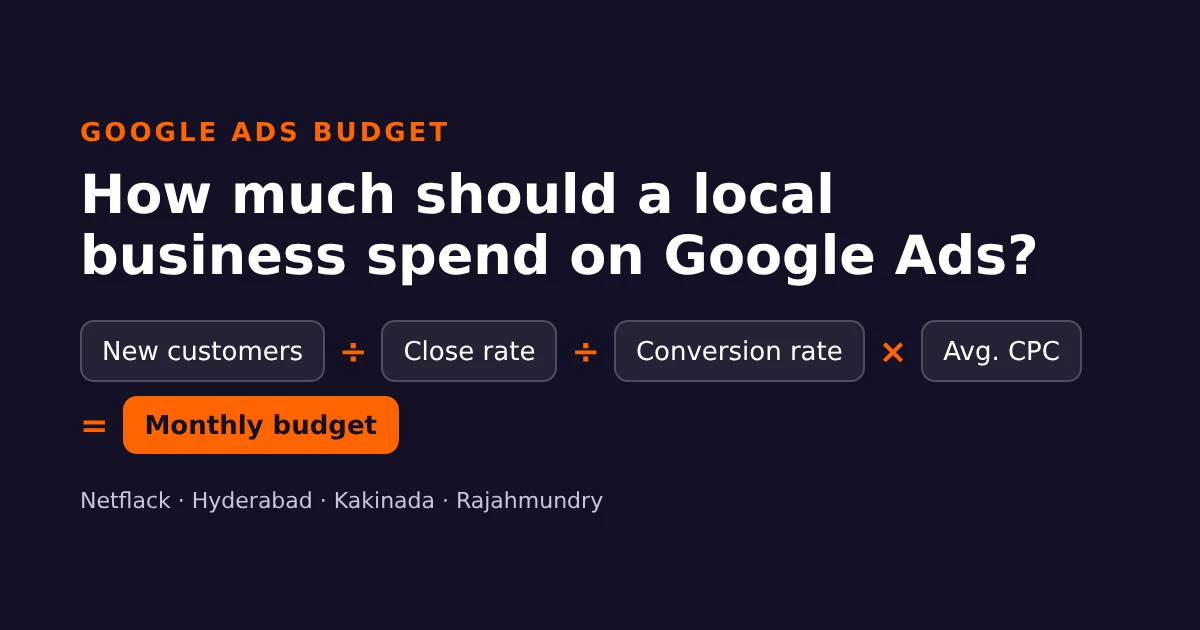
To set a Google Ads budget for a local business, work backwards from the customers you want, not from a round number. Multiply the clicks you need by what each click costs: monthly budget = (new customers ÷ close rate ÷ website conversion rate) × average cost per click. For many clinics, coaching centres and home-service businesses in Hyderabad, Kakinada or Rajahmundry, that lands somewhere between a few thousand and a few tens of thousands of rupees a month, and you can test it with much less.
Most owners pick a budget the other way round. They hear that ₹10,000 a month is “enough”, switch the campaign on, and judge Google Ads after two weeks. Some months it seems to work, some months it doesn’t, and nobody can say why. The formula below takes about 20 minutes, uses numbers you already have, and tells you whether Google Ads can pay for itself before you spend a rupee.
The five numbers you need
You need five inputs. Write your own beside each one before reading on. A rough guess is fine for now; you will replace guesses with real figures after the first month.
| Input | What it means | Where to find it |
|---|---|---|
| New customers per month | How many extra paying customers you want from Google Ads | Your own target or capacity |
| Close rate | Out of every 10 enquiries, how many become customers | Your enquiry book, CRM or WhatsApp history |
| Website conversion rate | Out of every 100 ad clicks, how many call, WhatsApp or fill the form | Google Ads conversions, or a careful estimate |
| Average cost per click (CPC) | What Google charges on average for one click on your ad | Google Keyword Planner |
| Value of one customer | What a new customer is worth to you over a year, after costs | Your billing records |
Step 1: Decide how many new customers you need
Start with the outcome. A physiotherapy clinic might want 20 new patients a month. A coaching centre might want 15 admissions before the next batch starts. Be realistic about capacity: there is no point paying for 40 enquiries a month if the front desk can only call back 15 of them.
Step 2: Work out your close rate
Your close rate is the share of enquiries that turn into paying customers. Count the last 30 to 50 enquiries from any source and how many of them paid. If 12 out of 40 became customers, your close rate is 30%.
This number matters more than most owners expect. A clinic that converts 50% of calls needs half as many enquiries, and so half the ad budget, as one that converts 25%. Often the cheapest way to “improve” Google Ads is to answer the phone faster and reply on WhatsApp the same hour.
Step 3: Estimate your website conversion rate
Conversion rate is the share of ad clicks that turn into an enquiry: a call, a WhatsApp message or a form. If 100 people click your ad and 7 contact you, your conversion rate is 7%.
If you have run ads before, Google Ads shows this figure once conversion tracking is set up. If you are starting fresh, use a cautious estimate for planning, such as 5%, and replace it with your real number after the first month. A clear landing page with a visible phone number, a WhatsApp button and a short form will usually convert far better than sending people to your homepage.
Step 4: Look up your cost per click
Open Keyword Planner inside your Google Ads account (Tools → Keyword Planner → Get search volume and forecasts). Enter the searches your customers actually type, such as “dentist in Kukatpally”, “physiotherapy near me” or “IIT coaching Kakinada”, and set the location to your city or a radius around your business. The tool shows a low and high range for the “top of page bid”.
For planning, take a figure near the middle of that range. Costs vary a lot by service, area and season, so always check your own keywords rather than trusting a number from a blog, this one included.
Step 5: Put the numbers together
Monthly budget = (new customers ÷ close rate ÷ conversion rate) × average CPC
Daily budget = monthly budget ÷ 30.4
Here is how that works for two local businesses. The figures are illustrative examples, not real client data or market prices.
Example 1: a dental clinic in Kukatpally, Hyderabad
| Step | Calculation | Result |
|---|---|---|
| New patients wanted | 20 a month | |
| Close rate 40% | 20 ÷ 0.40 | 50 enquiries |
| Conversion rate 8% | 50 ÷ 0.08 | 625 clicks |
| Average CPC ₹30 | 625 × ₹30 | ₹18,750 a month |
| Daily budget | ₹18,750 ÷ 30.4 | about ₹617 a day |
| Cost per new patient | ₹18,750 ÷ 20 | about ₹938 |
If an average new patient is worth ₹6,000 a year to the clinic after costs, paying about ₹938 to win one is a sound investment. If the clinic mostly does one-off checkups worth ₹500, the same budget would lose money, and the clinic should rethink its offer or its keywords before spending more.
Example 2: a coaching centre in Kakinada
| Step | Calculation | Result |
|---|---|---|
| Admissions wanted | 15 before the batch starts | |
| Close rate 25% | 15 ÷ 0.25 | 60 enquiries |
| Conversion rate 6% | 60 ÷ 0.06 | 1,000 clicks |
| Average CPC ₹15 | 1,000 × ₹15 | ₹15,000 a month |
| Daily budget | ₹15,000 ÷ 30.4 | about ₹493 a day |
| Cost per admission | ₹15,000 ÷ 15 | ₹1,000 |
With an annual fee of ₹30,000, spending ₹1,000 per admission is easy to justify. The bigger risk here is the close rate: if parents enquire but the centre takes two days to call back, a 25% close rate can quickly fall to 10%, and the real cost per admission more than doubles.
Check the budget against what a customer is worth
The formula tells you what Google Ads will cost. The next question is whether it is worth it. Divide your monthly budget by the number of customers you expect; that is your cost per customer. Compare it with the profit one customer brings in over a year.
- Cost per customer well below a customer’s yearly profit: Google Ads can work. Start testing.
- Roughly equal: it can still work if customers come back or refer others, but improve your close rate or landing page first.
- Cost per customer higher than a customer’s yearly profit: don’t scale ads yet. Fix the offer, the follow-up or the keywords, or focus on free channels such as your Google Business Profile and local SEO.
How Google spends your daily budget
Google Ads works with an average daily budget. On busy days it can spend up to twice your daily budget, and on quiet days it spends less. Over a month, Google won’t charge more than your average daily budget multiplied by 30.4 (the average number of days in a month). So a ₹500 daily budget means up to about ₹15,200 a month, even if one Monday costs ₹1,000.
This is normal, not a fault. Judge the campaign on monthly cost per enquiry, not on any single day.
Start smaller: a 30-day test plan
You don’t need the full budget on day one. A small, controlled test gives you your real conversion rate, CPC and close rate, and those three numbers make the formula far more accurate.
- Week 1: set up conversion tracking for calls, WhatsApp clicks and form submissions before the ads go live. Without it you are guessing.
- Weeks 1–2: run one Search campaign with 10–20 high-intent keywords (service + area), at around a third to half of the formula’s budget.
- Week 3: check the search terms report. Add negative keywords for searches that will never become customers, such as “jobs”, “free”, “course” or “salary”.
- Week 4: work out your real cost per enquiry and close rate, plug them into the formula, and decide whether to scale up, adjust or stop.
Five mistakes that waste local Google Ads budgets
- Showing ads outside your service area. In location settings, choose “Presence: people in or regularly in your included locations”. The default “presence or interest” option can show your Rajahmundry clinic ads to someone in Bengaluru who once searched for Rajahmundry.
- Broad keywords with no negatives. “Dental” alone attracts students, job seekers and people looking for tips. Use specific keywords and review search terms every week.
- Sending clicks to the homepage. Send each ad group to the page that matches the search, with the phone number and WhatsApp button visible without scrolling.
- Not tracking calls and WhatsApp. For many local businesses most enquiries never touch the contact form. If you only track forms, a working campaign will look like a failure.
- Changing everything every few days. Smart bidding and small budgets need time to settle. Make one change at a time and give it at least a week.
Quick checklist before you set the budget
- I know how many new customers I need and can handle each month.
- I have counted my close rate from real enquiries.
- I have checked CPC ranges in Keyword Planner for my area.
- I know what one customer is worth to me over a year.
- Calls, WhatsApp clicks and forms are tracked as conversions.
- My location setting targets people actually in my service area.
- I have a landing page that matches the ad, not just my homepage.
Want a second opinion?
If you would like someone to check your numbers or set up tracking properly, Netflack runs Google Ads for local businesses in Hyderabad, Kakinada and Rajahmundry. Our landing page and conversion work often lowers cost per enquiry before any extra ad spend. You can also contact the Netflack team for a free review of your current campaign.
About the author
krishna_k writes practical guides on SEO, AI search, analytics and Google Ads for small businesses at SyncNeck, a plain-English digital marketing blog for Indian business owners.
Topic: Digital Marketing
Related articles
 Digital Marketing
Real Estate Leads in Hyderabad and Vizag: Using AI to Qualify Meta Lead-Form Enquiries Faster
 Digital Marketing
AI Chat and WhatsApp Booking for Hyderabad Clinics, Without Breaking Patient Privacy
 Digital Marketing